

How I’m Using AI to Build an Operating System for My Business
How I’m using Claude and Notion to keep track of my ideas, decisions and progress while building a business alongside my full-time job
When you’re building something on the side, one of the hardest things is picking up where you left off.
You have an idea on a Tuesday night and scribble it down somewhere. By Saturday morning you’ve half forgotten it. Twenty minutes goes on finding the document, another twenty on remembering why you made last week’s decision, and before you know it, the time you set aside to work on your business has disappeared.
I’ve lost plenty of time this way.
For a long time, I thought of AI as a tool for writing faster or getting more done in the hours I could squeeze around my full-time job. But I’ve started using it differently.
I’m building an AI-supported operating system for my business. Something that helps me keep track of what I’m doing, remember what I’ve decided, capture ideas as they come and, most importantly, pick up where I left off.
Because when you’re building a business alongside everything else life throws at you, continuity matters.
Building a business with the life you actually have
Most of the business-building advice we see online seems to assume you have endless energy, a clear diary and plenty of uninterrupted time to work on your next big idea.
That isn’t the reality for many of us.
We have jobs, families, partners, ageing parents, bills and responsibilities. We’re fitting business-building around a life that’s already pretty full.
And for many women, we’re also navigating perimenopause or menopause. Changes in concentration, sleep and memory can make it harder to hold onto thoughts and ideas, particularly when we’re juggling lots of different things.
I know this feeling.
I’ll have a perfectly good idea while making dinner or just before going to sleep. By the time I get an opportunity to do something with it, I’ve lost the thread.
I’ve realised I don’t need to rely on my memory to hold everything together. I need a system that does some of that work for me.
That’s where AI has become useful.
Give your business somewhere to remember
One of the first things I noticed when I started using AI regularly was how much time I spent repeating myself.
Every new conversation meant explaining the business again. What it does, who it’s for, what I’ve already built, what I’ve tried and what I’ve decided not to pursue.
It was like having a new assistant every time I opened a chat.
So I started giving AI a better understanding of my business.
I use Notion alongside Claude. Notion is where my business records live, while Claude has the instructions it needs to understand my business and work with those records.
I’ve created a one-page Context Brief that explains what I’m building, who it’s for, where I am with the business, what I’ve already decided and what I’m working on.
I save this in my Claude project’s instructions, so I don’t have to keep explaining the basics every time I start a new conversation within that project.
There’s another part of this setup I particularly like: I rarely need to open Notion.
I have a free Notion account, but Claude does the writing and updating for me through its Notion connection. I can work in a conversation, ask it to record something or retrieve information, and carry on with what I’m doing.
The principle is simple: AI needs context to be useful. And your business needs somewhere reliable for information to live.
You don’t need an elaborate database or a complicated collection of tools. Start with one document that explains your business, what you’re working towards and where things currently stand.
Something simple that you actually maintain is far more useful than a beautifully designed system you never open.
Let AI help you think, not just produce
This has probably been the biggest change in how I work.
I used to think I needed to know exactly what to ask before I could get anything useful from AI.
Now I start with the messy version.
Here’s what I’m thinking. Here’s the problem. Here’s what I’ve tried. What am I missing?
I use it to explore options, challenge my thinking and work through problems. Sometimes it spots something I haven’t considered. Sometimes its suggestions are completely off the mark.
That’s fine. I don’t need it to be right every time. I need something I can work with.
Recently, I discovered a bug in one of my products that could have shortened the access period for paying customers when their access was reissued.
I asked Claude to help me investigate what was happening and explore possible fixes.
After reviewing the issue, I established that no customers had been affected yet. I documented the problem, recorded why I’d decided to park it and went back to what I’d planned to work on that morning.
When you’re building a business around a full-time job, it’s easy to let every new problem take over the time you’ve set aside to make progress. I don’t want to spend every Saturday chasing the latest thing that’s gone wrong.
AI can help you understand the problem. It can help you think through the options. But deciding what deserves your time and attention is still your responsibility.
Decide what AI can do and what stays yours
I’ve become quite deliberate about where I let AI take the lead and where I want to be involved.
For example, I don’t want anything permanent happening to my products, customers or money without my approval.
If Claude suggests a change to my code, I want to understand what it’s changing and why before I agree. If it recommends a course of action, I want to see the reasoning.
For routine tasks, however, I don’t need to be involved in every little step.
This distinction has made a real difference. I can delegate more confidently because I’ve established where the boundaries are.
The aim isn’t to hand over control of my business. It’s to stop spending my limited time doing things that don’t need my direct attention.
Capture the work before you forget it
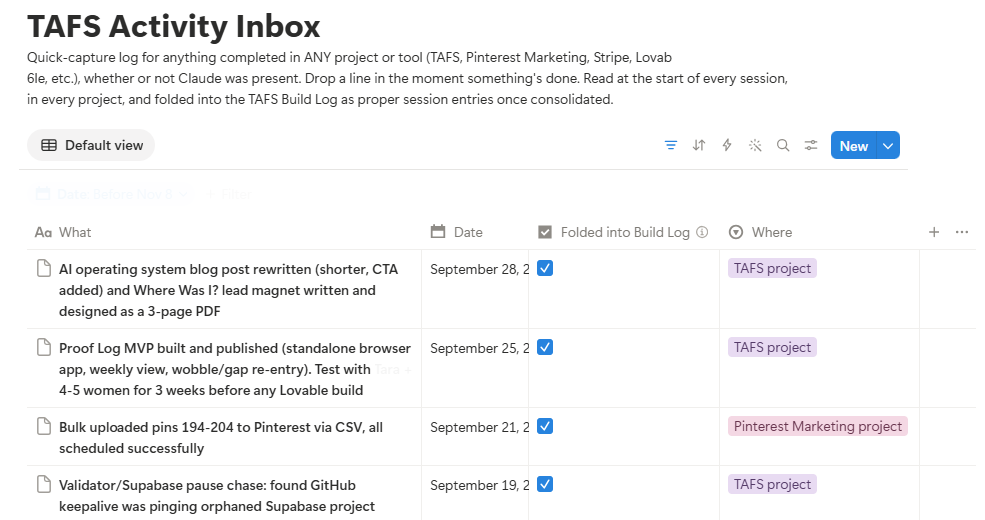
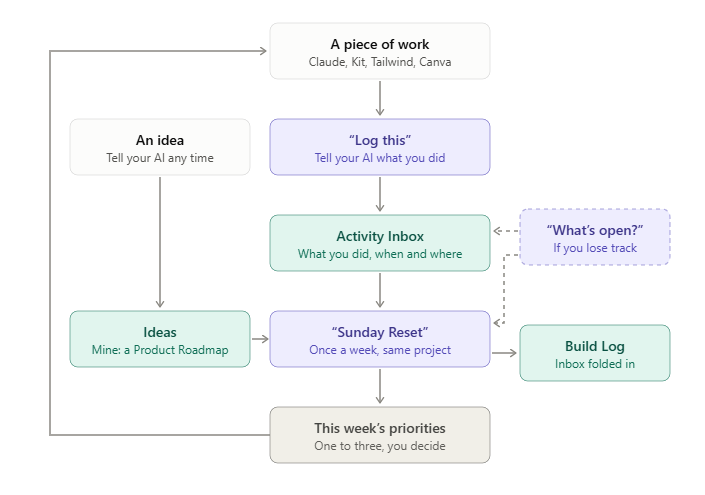
When I finish something, I tell Claude, “Log this.”
It adds an entry to my Activity Inbox in Notion, recording what I did, the date, where I did it and any decisions I made along the way.
It doesn’t matter whether I completed the work in Claude or somewhere else. For example, Pins scheduled in Tailwind, an email sequence in Kit or a change to a product all get recorded.
I also have somewhere for new ideas to go.
When something pops into my head, I tell Claude about it. It adds the idea to my Ideas database in Notion, with the date and a short summary.
I don’t need a special command for this. I just tell Claude about the idea.
I don’t have to decide whether it’s brilliant, whether I should act on it or where it fits into my current plans. I just need to capture it.
I can come back to it when I’m ready to think about what comes next.
It’s a small change, but it removes the pressure to remember everything.
My Sunday Reset
Because I’m recording my work as I go, I don’t have to spend Sunday afternoon trying to reconstruct what happened during the week.
I simply say, “Sunday Reset.”
Claude takes the week’s entries from my Activity Inbox and brings them together in my Build Log. It marks the entries that have been included so nothing gets counted twice, and checks our recent conversations within the project for anything I might have forgotten to record.
It then looks at what’s still outstanding, considers my Ideas database and what I’m working on that month, and suggests between one and three priorities for the coming week.
I review them, change anything I disagree with and decide what I’m actually going to focus on.
There’s another part of the reset that I particularly value.
Claude asks me for my numbers for the week and how the week felt.
The numbers tell me what I’ve done. How the week felt tells me something different.
Did I make progress but feel completely exhausted? Did I spend the week reacting to problems rather than moving things forward? Did I have enough energy left for the rest of my life?
It’s easy to measure a business by its output. I also want to pay attention to what building it is costing me.
When I’ve lost track, I ask
I don’t start every working session with a review. But there are days when I’ve forgotten what I was doing, which decisions I’d made or where I intended to go next.
That’s when I use another simple instruction: “What’s open?”
Claude looks at my latest Build Log entry, the Activity Inbox entries added since then and the conversation from our last Sunday Reset.
It brings together what I was working on, what’s still outstanding and what I’d planned to prioritise.
Instead of spending the first half-hour trying to reconstruct my own thinking, I can get back to the work.
Recently, I’d had a particularly challenging week at work, with a looming deadline taking up most of my attention. I was focused on getting every detail right and, by the middle of the week, I found myself struggling to remember what I’d planned to focus on during my TAFS work that day.
I asked Claude, “What’s open?” and it brought me back to where I’d left off. It gave me a list of outstanding actions. Some needed considerably more time and concentration, such as fixing an issue with my customer journey workflow. Others were much more manageable, like sending messages to potential participants for my upcoming Work Club pilot.
Given how demanding my week had been, I chose the smaller action. I was still making progress with TAFS, without putting myself under pressure to tackle something I simply didn’t have the energy for that day.
That’s the bit I value most. I can close my laptop on Friday and return to my business on Saturday without having to start the thinking process all over again.
What the setup actually looks like
The system has three places where information is kept:
- Ideas: A place for new thoughts and possibilities, so I don’t lose them or have to act on them immediately.
- Activity Inbox: A running record of what I’ve done, where I’ve done it and any decisions I’ve made.
- Build Log: A dated record of my progress, weekly priorities, numbers and reflections.
Claude knows how to use these records because I’ve given it a set of instructions within a dedicated project.
There are four instructions:
“Log this.” Records the work I’ve completed.
“When I tell you about an idea.” Adds it to my Ideas database.
“Sunday Reset.” Brings together the week’s work, reviews what’s outstanding and helps me decide what to focus on next.
“What’s open?” Helps me find my way back when I’ve lost track.
I don’t need to remember how everything works behind the scenes. I just need to know what I want Claude to do.
Want to build your own?
If you’ve ever sat down with a precious hour or two to work on your business and spent the first twenty minutes trying to work out where you left off, I’ve put together something to help.
It’s called Where Was I?
It’s a free, three-page guide showing you how to set up this same system using Claude and Notion.
Inside you’ll find:
- A simple map showing how the system works.
- Step-by-step instructions to set it up in one morning.
- Four instructions you can copy into Claude.
- A fill-in Context Brief to help Claude understand your business, your decisions and what you’re working towards.
You’ll need a paid Claude plan (the Notion connector requires one) and a free Notion account.
You don’t need to become a Notion expert. Claude does the writing to your records for you.
Building a business that fits around your life
I have a full-time job, limited time and finite energy. Some days my brain is full of ideas. Other days I struggle to remember what I walked into a room for.
I don’t want building a business of my own to become another source of pressure.
I want to make progress, close my laptop, get on with the rest of my life and come back knowing where I was.
This is what I’m trying to build: a way of working that doesn’t depend on me remembering everything or having hours of uninterrupted time available.
And I think there’s something particularly useful about that for women building businesses in midlife.
We don’t need another demand on our time. We need ways to make the time we have work harder, without making our lives harder in the process.
For me, that’s where AI is starting to earn its place in the business.